


Phishing attacks often try to arouse interest by impersonating actual companies, products or brands. And the more popular or pervasive the company or brand, the greater the chances of trapping unsuspecting victims. That’s why Microsoft products are always a tempting target to spoof. A new phishing campaign analyzed by email security provider Avanan exploits a key feature in Microsoft Outlook.
SEE: Social engineering: A cheat sheet for business professionals (free PDF) (TechRepublic)
Must-read security coverage
- UK Police Convicts Pair in £5.5 Billion Bitcoin Launder Case
- Blackpoint Cyber vs. Arctic Wolf: Which MDR Solution is Right for You?
- How GitHub Is Securing the Software Supply Chain
- 8 Best Enterprise Password Managers
In a blog post released on Thursday, Avanan described a campaign that uses both Outlook and Microsoft’s Active Directory to trick users into handing over valuable data or money. The company discovered this specific instance in December 2021 as part of its regular research on vulnerabilities.
Though not yet observed in the wild, the campaign is active and could easily spread around the world, according to Jeremy Fuchs, cybersecurity research analyst at Avanan and author of the blog post.
To use Outlook against its users, hackers simply start by devising a phishing email that appears to be sent from an actual person. With their own private server, they can even create an email that seems to come from another sender, turning this into a domain impersonation attack.
If the spoofed email skirts past security defenses, Outlook will present it as a real message from the person being impersonated. The email displays all of the person’s legitimate Active Directory details, including photos, shared files, email address and phone numbers. The recipient can then see all the times they’ve communicated with the spoofed person, including their pictures and any files shared.
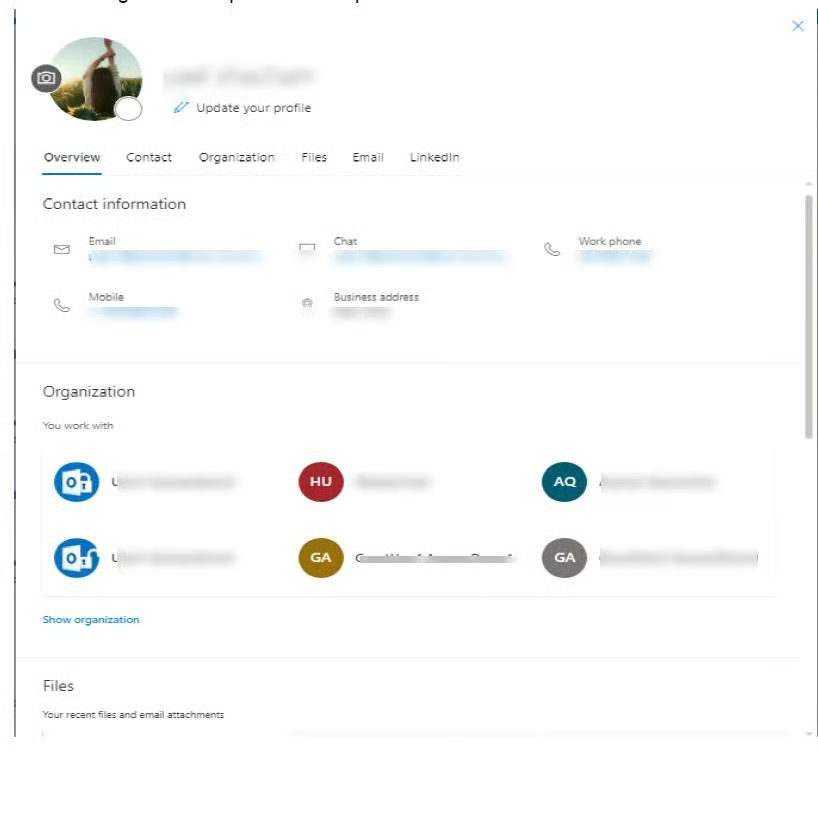
Through this campaign, the attackers can exploit the way that Outlook prioritizes productivity over security, according to Avanan. On its own, the Outlook client doesn’t perform email authentication, such as SPF or DKIM checks. Instead, that task is left up to any email security in place before a message hits someone’s inbox. And since Microsoft doesn’t require verification before updating a user’s image in an email, all the necessary and actual Active Directory contact details appear, even with an SPF fail.
SEE: Warning: 1 in 3 employees are likely to fall for a phishing scam (TechRepublic)
To protect your organization against this type of sophisticated social engineering attack, Avanan provides the following tips:
- Make sure you’ve implemented layered email security that kicks in before a message reaches the inboxes of your users.
- Set up an email security solution that scans files and links and measures domain risk.
- Protect all applications that interact with Active Directory, including Microsoft Teams and SharePoint.
- Finally, this article from Microsoft partner CodeTwo explains how to prevent internal email spoofing in an organization that uses Exchange.
- Checklist: Securing digital information (TechRepublic Premium)
- How phishing attacks spoofing Microsoft are evading security detection (TechRepublic)
- Microsoft Office 365 still the top target among phishing attacks (TechRepublic)
- How to report a phishing or spam email to Microsoft (TechRepublic)
- How to become a cybersecurity pro: A cheat sheet (TechRepublic)